
Motion Sequence to PNG.
Show the path of a moving subject in one photo.
Choose moments from a fixed-camera video or burst and keep them in place on the same background.
Drop a video or photo burst
One video or two or more JPG / PNG photos from a fixed camera.
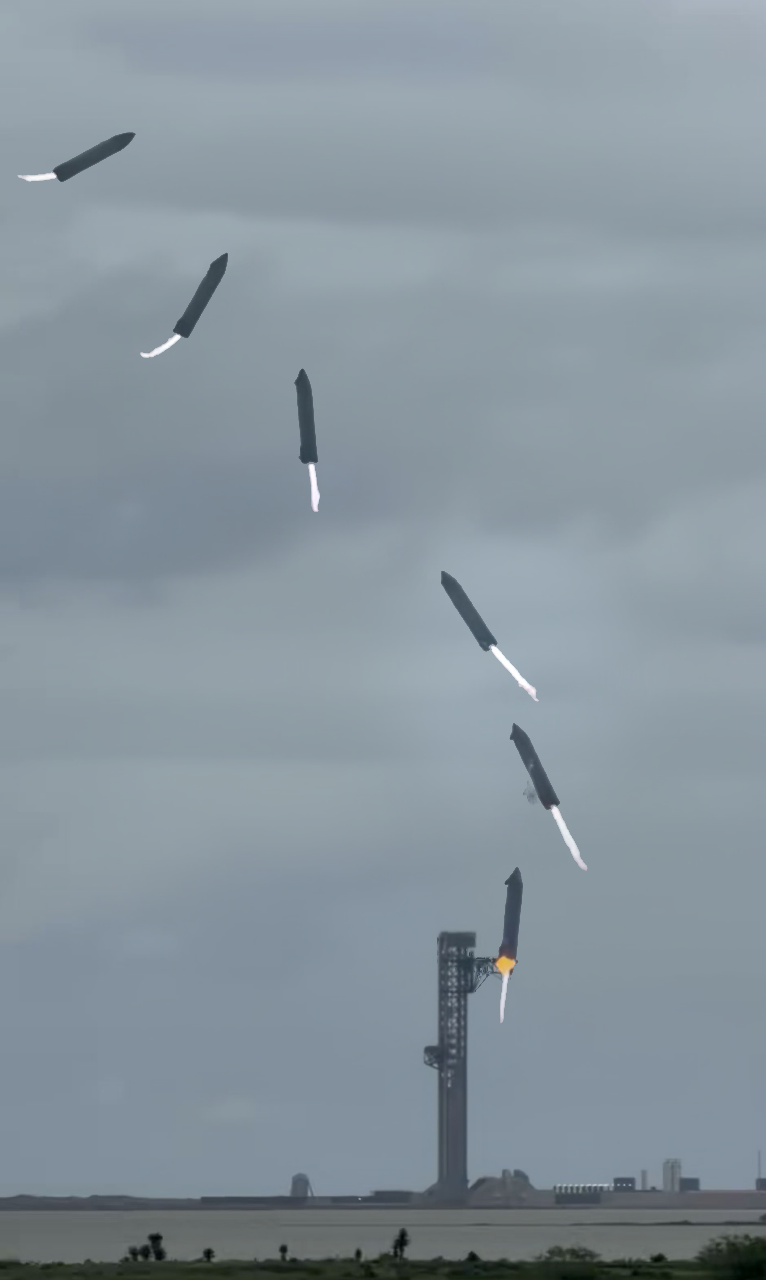
A Starship tower catch in six moments

Watch the tower stay still as Starship turns and descends. The shot was stabilized before import, then trimmed to the ten seconds between 1.5 s and 11.5 s.
Formatide uses eleven frames to estimate the sky and tower. Watch it add six selected poses, one at a time, where the ship appeared in each frame.
- 1.5 s
- 2.5 s
- 3.5 s
- 5.5 s
- 7.5 s
- 11.5 s
The six positions now share one background. Download the 766 × 1280 image, or open the same frames in the editor to change the sequence.
Working with motion sequences
What kind of motion works best?
Keep the camera still and capture the subject moving across the scene. A runner, a bouncing ball or a pet jumping across the frame can all work. Include moments when the subject moves away and reveals the background.
Can I use a video that follows the subject?
Align the background before importing a tracking shot. Match the same fixed landmark across frames so the subject can move relative to it. The Starship example includes eleven prepared frames you can open directly in the editor.
Which files can I use?
Choose one video your browser can play, such as an H.264 MP4, or at least two JPG or PNG photos. Use the same camera angle and aspect ratio throughout the burst. Photos start in natural filename order.
How are the moments chosen?
Up to twelve samples cover the action range. All samples help estimate the background. The tool picks up to six moments, favoring different times and subjects that occupy different parts of the scene.
How do I include a missed instant?
Tap a thumbnail to add or remove its subject. For an instant between samples, open Replace a moment, select the pose to replace, then choose a source photo or pause the video where you want it.
How can I clean up the background?
Raise subject sensitivity to recover subtle details or lower it to suppress small changes. Paint with Erase residue to restore the estimated background. Undo stroke removes the last brush mark. If the background was hidden throughout, try a wider range.
What size is the PNG?
The preview fits within 640 pixels on its longest edge. Export reads the same moments from the original files at up to 1280 pixels, keeps the aspect ratio, and reapplies your brush strokes. Smaller sources keep their dimensions. All file processing runs on your device.